اعلان

Website

المدونة

ملاحظات يجب قراءتها:

1. نتبرئ من استخدام أي موضوع في المدونة في طريق الحرام أو ضد المسلمين.
2. إن لم تجد الموضوع الذي بحثت عنه في محرك البحث، استخدم البحث الداخلي في المدونة.
3. هناك مراكز رفع ملفات تحتاج الى استعمال بروكسي للتحميل المجاني دون عمل حساب مدفوع مثل مركز رفع uploading.com
4. نعتذر عن عدم توفر بدائل لبعض الروابط المفقودة
5. الرجاء فحص الملفات جيداً قبل التشغيل فيما يخص أدوات الهاكرز و الفيديو..الخ
6. ليست كل البرامج كاملة و ليست كل البرامج تحتاج الى تسجيل!!؟؟
7. عزيزي الزائر تشرفنا بزيارتك، و أعلم أنك لست أول زائر و لن تكون الاخير بإذن الله تعالى، تمتع بتصفح المدونة دون مشاكل بإذن الله...
8. لا تنس استخدام (رسائل اقدم) لرؤية باقي مواضيع التصنيفات

انشاء المدونة

تم انشاء المدونة في:

07\01\2009

Black ice

كل عام و أنتم بألف خير بمناسبة مرور 4 سنوات على انشاء المدونة و الحمدلله

ĬŖŞĤ@ĮĐ مدونة الخدع و الشروحات إرشيد الجرايدة ĬŖŞĤ@ĮĐ

‏إظهار الرسائل ذات التسميات Windows programs. إظهار كافة الرسائل

برنامج لإلغاء التثبيت الكامل للبرامج Total Uninstall Pro 6.0.2

Features:
"Careful analysis of the existing installed programs and create a log of changes for a new installation
"Monitoring changes in the registry and file system for new installations
"A complete and thorough removal of the analyzed application or otmonitorennyh
"Display a list of installed programs and otmonitorennyh with the relevant application icons
"The Organization of the applications installed and otmonitorennyh
"Easy and fast search program to remove keyword
"Brief and detailed information about each installed application, and otmonitorennom
"Use custom settings to detect changes
"A detailed log after removing the selected program
"Powerful search in detected changes
"Stand-alone, low resource system, the agent for notification of running installation of new applications
"Export registry changes for install or uninstall
"Export list of installed applications and otmonitorennyh in a separate file
"Export to file or print detected changes


برنامج لاستعادة الملفات المحذوفة من الحاسوب FileRestorePlus v3.0.3 Build 511

Features:
• After scanning your hard drive, FileRestorePlus ™ creates file-type icons in the left margin of the screen that allow you to easily filter by file type
• FileRestorePlus ™ will create folder view for the deleted files.
• FileRestorePlus ™ will also allow filtering by size, date modified, and parts of the file name
• FileRestorePlus ™ is a small, fast, useful, practical, and powerful.
Year: 20,102 OS: Windows 2000/XP/Vista/7 Language: English Crack: Keygen-TSRH Size: 1.8 MB

روابط التحميل:


برنامج لتغيير ماكس أدرس Change MAC Address 2.4.0 Build 79

With this tool, you will quickly change the MAC address of your network card no matter what its manufacturer and driver is. You will be able to change the MAC address with a couple of mouse clicks in just several seconds.

Every network adapter has a unique MAC address embedded by the manufacturer in the firmware of the network adapter chip. Sometimes you may need to find out or change the MAC address of the network adapter, for example, if it is used for Internet access authentication. Or if you need to hide your MAC address for security reasons.

You can spoof the MAC address very easily with our program. All you have to do is click a few buttons. During this operation, you can select a different manufacturer or generate a completely random MAC address.

Key features

Showing the MAC address of your network adapter
Showing the manufacturer of you network adapter
Replacing the MAC address with any other address
Generating a completely random MAC address
Setting a MAC address of another manufacturer
Setting a MAC address without changing the manufacturer
Automatically activating the new MAC address after the change
And all that in just a couple of mouse clicks!

Home Page: http://lizardsystems.com/change-mac-address/


روابط التحميل:

برنامج لنسخ الديفيدي DVD neXt COPY neXt Tech Edition 4.4.9.4

Features:
Windows 7, VISTA, XP, 2000 Compatible
Fastest Speed ​​engine for faster copies
Highest quality engine
Improved and newly designed neXt Tech ™, for copying your latest DVD movies
Copy VideoDVD to BluRay (Copy up to 10 VideoDVDs on 1 BluRay) (Industry First)
Copy DVD movies to your iPod, PSP, Zune (Windows Media Video)
Copy DVD movies to DVD
Copy DVD movies to PS3
Copy DVD to iPad
Copy DVD movies to your computer
Copies DVD Movie to One Blank Disc (No Need to Split)
Copy VideoDVD and Common Discs (Special Feature / DigitalCopy Disks)
Copy episodic DVD movies
Copy Full Multi-Channel Audio (Dolby Digital 5.1, DTS)
Copy Common Disk directly to another drive (on-the-fly)
Copy Common Disks to DiskImage
Copy and Burn to Multiple devices
Make copies of DVD copies
Built in special neXt Tech ™ Updater software that allows you to update your own DVD movies
neXt Tech ™ log creator for remote assistance
Share updated DVD movie Data Base Files with other computers
Virtual Player for improved DVD analyzing of new DVD movies
Ability to Disable Fast Play function on DVD movies
User interface with an easy to follow work flow
Automatic update checker detects new version updates
Activation system for easy license transfer between computers
Convert all know DiskImage Types to ISO (to open with DVDneXtCOPY)
Burn all known DiskImage Types with DVDneXtCOPY
Burn own DiskImageTypes with DVDneXtCOPY
Added Pre-scan for high quality
Extended BadSector Scanning
Auto-fill BadSectors
Iimproved VideoDVD content list
WebControl for better information about updates and new features
Integrated BluRay Browser for XP
Option to remove region limitations
Option for auto remove DTS audio stream
Option to erase and reuse rewriteable disks
Option to preview tracks before and during copying
Option to adjust deposit Buffer (to avoid over flowing copies)
Option to jump directly to menu. The copy will not play trailers
Option to use 1, 2 or 4 Processors (DualCore or QuadCore)
Supports all Dual Layer / Single Layer / BluRay discs and burners
Supports all SCSI, IDE, USB DVD burners / recorders
Supports 1x - 20x speed blank media
Supports both NTSC and PAL DVD movies

What's new in this version:
Updated neXt Tech DB
Fixed new ASTSRV issues
Fixed Activation System
Fixed Minor Bugs
Updated Internal Linking
Updated Dynamic Window
Updated Resources V4.4.9.1

Released: 2012
Operating System: Windows 7/Vista/XP
Bit: X86 (32 bit) and X64 (64 bit)
Language: English
Medicine: there
File Size: 15.03 MB 
 
 
روابط التحميل:
 

برنامج اعادة تسمية الملفات و المجلدات دفعة واحدة Rename Master


 http://www.joejoesoft.com/vcms/108/

منبه للكمبيوتر ويندوز Free Alarm Clock 2.7


http://freealarmclocksoftware.com/FreeAlarmClockSetup.exe

http://download.freewarefiles.com/files/FreeAlarmClockSetup.exe

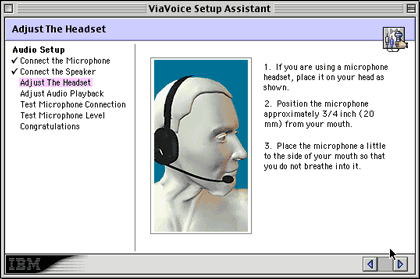
تكلم بالعربي و الكمبيوتر يكتب بدلا منك IBM ViaVoice Gold v.4.3

مفاجئة IBM ViaVoice Gold v.4.3 

السلام عليكم ورحمة الله وبركاته


هدية عام 2009

IBM ViaVoice Gold v.4.3


البرنامج لنظام التشغيل ويندوز ولكن لم أجد شىء للماكنتوش


برنامج رائع جدا مهما حكيت 
لن أستطيع وصف روائعه


برنامج تتكلم وهو يتولى عملية الكتابة عنك


وطبعا بيوفر جهد كبير جدا للذين يكتبون ويطبعون على الكمبيوتر


والمفاجئة الكبرى أنه يكتب عربي


تحميل البرنامج: Size: 196 MB


تصاميم ثيمات للمتصفح الفايرفوكس

تصاميم ثيمات للمتصفح الفايرفوكس

بسم الله الرحمن الرحيم


معي موقع فيو تصاميم ثيمات لمتصفح الانترنت الفايرفوكس

شيء جميل جداً


أدخل الى الموقع باستحدام متصفح الفايرفوكس:

http://www.getpersonas.com

ثم اتجه الى الأستوديو على هذا الرابط:

http://www.getpersonas.com/gallery/All/Popular


الآن اختر التصميم الذي تريده و كذلك يمكن اختيار التصميم من التصنيفات على يسار الصفحة


بعد ظهور صفحة التصميم اضغط على wear this ليتم معاينة الثيم
و ربما عليك تثبيت الثيم، ثبت التصميم كأي اضافة و أعد تشغيل المتصفح، ليظهر لك رونق خاص و تصميم جميل لمتصفح رائع.


الزعيم إرشـــــــــ الجرا ـــــــــــــــيـــــــــــــــــــــدة

Al-JaRaYdEh JoRdAn

Mr. Irshaid Al-Jaraydeh
AL-Mafraq-ALOrdn


Rapid Share downloader (2.1.5

Rapid Share downloader (2.1.5 newest)


Rapid Share downloader 

This is a rapid share downloader. I found some script's on the internet added them together. The programm work great for me that's why i will share it. 

Comming Soon 
Some ppl told me they have problems with starting the programm. Just Right click and open as administrator will fix it soon when i am back from vakation. 

Fixed: 
Some bugs ppl reported. 
Changed lots of code for stability 
Optimized memory consumption 

Added: 
IP request Tries to release and request a new IP between downloads, As a fresh IP would mean no 15min wait. (only works for ppl with dynamic ip and directly conected to the modem.) 
thnx download (thnx download is the very last download when all your downloads are done. Just to give me 1 rs point. 
why? ppl are ripping this topic and share it every where. They even use the same screen shot's everything. -.- i spend much time they need like 2 min to rip it (isn't it mvalentino, kash flash, blogman and mvpkvp 
Posting on a other forum i don't mind but rip all and post on warez bb is just lame). 
Proxy, it will check your intenet explorer proxy settings. (Might not work on every internet explorer on every OS working on it). 
Bad links, so u can check what failed with downloanding and why. 
And a few little updates maybe u will see them 
Disk space warning. When disk space will be full it will give u a warning. 
RS downloader can only be oppend 1 time. 
Overwrite rules . If unchecked, Links which filename already exist in download folder, will be skipped. If checked only overwrite if filesize is larger then existing file 

This is how the rapid share downloader looks like. 


Image

Image

Image

Image

Image

Image

Image

Image

Image

Image


354 KB (362,797 bytes) size of the RAR.
401 KB (410.624 bytes) size of the App. 


Code:
http://rapidshare.com/files/256698354/RapidShare_Downloader_v2.1.5.rar


Speed Connect Internet Accelerator v7.5 Incl Keygen and Patch

Image

A very nice and Handy tool .Top internet accelerator (according to PC Magazine), a network settings optimizer to speed up your existing Dial-Up Modem, DSL, Cable, Wireless, LAN, High-speed internet connections released by DIGERATI just try it!!

SpeedConnect Internet Accelerator is a powerful Windows application designed to optimize your network connection and speed up all your internet activities. This translates into a faster internet connection, faster browsing and email, faster downloads, faster online gaming, improved Skype connection

Features:
Code:
The speed of your network connection doesn’t just depend on the speed of your hardware. Windows is an operating system that is designed to work on a variety of different hardware and network setups. Because of the abstract nature of the operating system, it cannot be optimized for user-specific hardware setups


Release name: Speed Connect Internet Accelerator v7.5 Incl Keygen and Patch-DIGERATI
Size: 3.26 MB

Code:
http://rapidshare.com/files/251701621/Speed_Connect_Internet_Accelerator_v7.5_Incl_Keygen_and_Patch.rar


 Profile  
 

PowerArchiver 2010 v11.50

Image


Image

PowerArchiver 2010 Professional v.11.50.61 

Quote:
PowerArchiver offers hundreds of features, yet remains easy to use, small and fast. Novice users will find a familiar interface complete with tutorial and detailed help, while more experienced users can take advantage of full Explorer integration, multiple encryption methods and advanced compression algorithms. PowerArchiver is an award-winning archive utility for the Windows® family that provides support for most compressed and encoded files, as well as access to many powerful features and tools through an easy to use interface that seamlessly integrates with Windows Explorer. PowerArchiver creates and works with unlimited size ZIP archives with enhanced ZIP format speed and compression; a Password Manager stores your frequently used passwords; encrypts your archives using 5 different methods including 256-bit AES; back up your work with PowerArchiver's Auto-Backup tool and FTP support; creates powerful CAB and ZIP self extracting (SFX) archives using a Wizard; a Batch ZIP tool compresses hundreds of files all at once; and a Multi-Extract tool can extract hundreds of archives instantly.


Complete Feature List:
• Complete built-in support for 7-ZIP, ZIP, CAB, LHA (LZH), TAR, TAR.GZ, TAR.BZ2, BH, RAR, ARJ, ARC, ACE, ZOO, GZ, and BZIP2 file formats
• Support for reading and extracting disc image formats: ISO, BIN, IMG and NRG
• Built-in support for XXE, UUE, and yENC encoded files and full MIME (Base 64) support
• Creating ZIP and CAB and PAE encrypted self-extracting archives using a Wizard interface
• Support for unlimited size ZIP archives, with improved performance when working with 100,000+ files
• Support for Deflate64, providing improved compression results (both size and speed)
• Complete support for PKZIP 4.0 and PKZIP 4.5 disk spanning
• Compression Profiles to store frequently used compression settings
• Full support for ZIP AES encryption, 128-bit/192-bit/256-bit (supports: PKZip 5.1 (full), Secure Zip 8.0 and WinZip 9.0 AE-1 & AE-2) and proprietary PAE format using 5 different methods: Blowfish (128-bit), DES (64-bit), Triple DES (128-bit), AES 128-bit, and AES 256-bit
• Support for AES encrypted 7-Zip archives and multivolume 7-Zip archives
• Uploading archives or backups directly to FTP or SFTP (SSH) sites with multiple profiles supported and timeout option
• Password manager for saving frequently used passwords
• Tool for creating PBS backup scripts and running automated backups
• Internal viewer that supports TXT, RTF, GIF, PNG, BMP, ICO, TIFF, GFI, SGI, EMF, WMF, PPM, Adobe Photoshop, Autodesk, Truevision, - ZSoft Paintbrush, Kodak Photo-CD, JASC PaintShop Pro, and Dr. Halo file formats
• Many powerful archive operations (including: renaming files in archive, spanning archives, testing archives, viewing and writing comments, installing archives, and checking archives for viruses)
• Drag and Drop from/to Windows Explorer and the Desktop
• Two ways of viewing archives (Classic - all files in the same listing; Explorer - browsing through an archive like folders in Windows Explorer)
• Complete integration with Windows (extracting archives and creating archives directly from Windows Explorer using powerful "Explorer Shell Extensions")
• Ability to edit files within an archive using one single operation
• Printing file listing to text file or HTML document
• Tool for repairing corrupted ZIP archives
• Converting between file formats (for example: changing a ZIP archive to CAB archive, or LHA archive to ZIP archive)
• Extracting multiple archives at the same time
• Batch Zip function to create multiple different archives at once
• Favorite Folders to quickly locate archives
• Powerful Find function for searching within an archive
• Auto Update to automatically download and install new versions of PowerArchiver
• Powerful help in HTML and a tutorial with pictures for beginners
• Full skinning support via PSF files - includes interface skins, toolbar skins, icons and customizable application settings
• Customizable toolbar that can be docked to any side of the application or float independently
• Windows XP Theme and ClearType support


Quote:
Version 11.50 [July/2009]
New Features:
Brand new ZIP Engine:
* Multicore deflate zip engine, almost 4x faster than single
core systems on quad core computers.
* Improved speed of zip compression and extraction on any occassion.
* Support for LZMA, PPMd, BZIP2 and WAVPACK in ZIP, according to
latest ZIP standards. Both write and read support, making PowerArchiver
only application that supports
Winzip 12 and earlier files, while providing
faster and stronger compression (up to 4x) compared to WinZip 12.
* Full support for new .zipx extension for advanced compression methods.
* Multicore LZMA engine for ZIP.
* Support for Unicode in ZIP, both read and write. Implemented throughout
application.
* Faster loading of archives with thousands of files.

Windows 7:
* Full Windows 7 support with jump lists, taskbar progress and taskbar
icon overlays. First archiver to do so.
* First application with new DirectSkin 6.0 engine that supports
Windows 7 (32bit).

PA Shell Extensions 2.0:
* Added Extract MRU shell extensions.
* Added Compress to MRU zip shell extensions.
* Added FTP profiles in shell extensions, ftp directly to selected
account via shell.

Backup Improvements:
* Moved backup to standalone application for easier handling, faster load
times.
* You can add multiple folders in backup filelist.
* Considerably faster zip backup when handling 10,000+ files.
* Better info on files/folders in file list (number/size).
* Fixed major issue with 7-Zip backups and larger number of files.

Improvements:
* RAR optimizations - up to 20% faster RAR extraction than before,
including WinRar. Faster unrar engine on the market.
* Faster compression - "Preparing compression" stage up to 10x faster both
in main PA and PA Backup for all compression formats.
* Interface improvements in Modern interface - faster and better looking.
* Interface improvements in Classic interface - more MRU's, more usable.
* New Add window in main Powerarchiver, most usable options are now shown
on first screen.
* You can now select multiple folders in all folder selection windows
(backup, tools, etc).
* Optimized 7-Zip's Optimized compression - Ultra and Max feature stronger
compression now.
* Added New Folder and Network buttons in Add window, improved look of
other icons.
* Unicode support for other formats that support unicode in rest of
PowerArchiver interfaces.
* Added method property in file list and properties window.
* Better support for Enterprise installations.
* Many smaller improvements in Burner and FTP applications.
* Other smaller improvements throughout the rest of application.

Bug Fixes:
* Fixed Bug #1000: No caption in burner taskbar under special conditions.
* Fixed Bug #987 : Doubleclick on file sometimes uses 100% cpu if preview is on.
* Fixed Bug #303 : Support for multiple selection in burner.
* Fixed Bug #958 : D&D inside of folder in archive does not save path properly.
* Fixed Bug #997 : Cant align toolbar properly when some windows are on (Preview, etc).
* Fixed Bug #969 : Various burner options shown in shell/starter even if Standard.
* Fixed Bug #970 : CRC error when not enough space on disk (rar).
* Fixed Bug #703 : Cancelling extraction of large files takes long time.


Image

Image

Code:
http://rapidshare.com/files/257017000/PowerArchiver.2010.v11.50-DOA.rar

Mirrors

Code:
http://www.filefactory.com/file/ahea122/n/PowerArchiver_2010_v11_50-DOA_rar
http://www.megaupload.com/?d=8L8ZTSCO




Allok 3GP PSP MP4 iPod Video Converter 6.2.0603

Image

Quote:
* Video source supports AVI, Divx, Xvid, MPEG, MP4, M4V, WMV, ASF, RM, RMVB, SVCD, VCD, VOB, MOV, MOD, 3GP, FLV, MKV, OGM any video format play-able.
* Supports AAC, AC3, AMR, MP3, MP2, M4A, OGG, WAV, WMA,etc, Audio formats.
* All Video to 3GP Converter.
* All Video to 3G2 Converter.
* All Video to AVI Converter.
* All Video to DivX Converter.
* All Video to XviD Converter.
* All Video to MP4 Converter.
* All Video to ASF Converter.
* All Video to WMV Converter.
* All Video to MOV Converter.
* All Video to iPod Converter.
* All Video to PSP Converter.
* All Video to ZUNE Converter.
* All Video to H263 Converter.
* All Video to H264 Converter.
* All Video to MPEG1 Converter.
* All Video to MPEG2 Converter.
* All Video to VCD Converter.
* All Video to SVCD Converter.
* All Video to DVD Converter.
* All Video to MOV Converter.
* All Video to PS3 Converter.
* All Video to Apple TV Converter.
* All Video to Xbox360 Converter.
* All to MP3 Converter.
* All to MP2 Converter.
* All to AAC Converter.
* All to AC3 Converter.
* All to M4A Converter.
* All to WMA Converter.
* All to OGG Converter.
* All to WAV Converter.
* All to AMR Converter.
* Convert video for Acrchos AV400, Archos AV500, Archos AV700, Archos Gmini402.
* Convert video for iRiver MP4 Player.
* Convert video for Creative Zen Vision.
* Convert video for Cellular Phone.
* Convert video for Palm or PDA.
* Inside mpeg4/H264 encoder.
* Batch files conversion.
* High-speed encoder ensures smooth conversion of video and audio data.
* Direct any video files to AVI/3GP/MP4 format with high quality.
* Movie scene spot edit-able.
* Support various subtitle file .
* Keep the original aspect ratio or resize movie to fit resolution.
* Customize the resulting file quality.
* Adjust framerate and bitrates in resulting movie.
* Support Drag and Drop.
* Preview source clips
* Shutdown computer automatically when job is done.
* Simple GUI and very EASY to use.
* Lifetime FREE Technical Support and FREE upgrade Free trial download.30 day money back guarantee .

System Requirements of Allok 3GP PSP MP4 iPod Video Converter:

* Windows 2000/ME/XP/2003 operating system.
* DirectX8.1 or higher (DirectX9.0 is recommended)
If you have any problem on downaloading DirectX please feel free to visit Microsoft DirectX Downloads
* Pentium 300 MHz or better
* 128M or more RAM


Code:
http://rapidshare.com/files/253946149/Allok.3GP.PSP.MP4.iPod.Video.Converter.6.2.0603.Full.Version.rar


Scientific American 2008 - Complete Collections

Scientific American 2008 - Complete Collections

Language: English
Format: PDF
No password, single extraction file

download links:
Code:
http://rapidshare.com/files/194754456/Scientific_American_2008-01.rar
http://rapidshare.com/files/194735771/Scientific_American_2008-02.rar
http://rapidshare.com/files/194733022/Scientific_American_2008-03.rar
http://rapidshare.com/files/194734121/Scientific_American_2008-04.rar
http://rapidshare.com/files/194736968/Scientific_American_2008-05.rar
http://rapidshare.com/files/194738644/Scientific_American_2008-06.rar
http://rapidshare.com/files/194739297/Scientific_American_2008-07.rar
http://rapidshare.com/files/194741635/Scientific_American_2008-08.rar
http://rapidshare.com/files/194743071/Scientific_American_2008-09.rar
http://rapidshare.com/files/194748018/Scientific_American_2008-10.rar
http://rapidshare.com/files/194752276/Scientific_American_2008-11.rar
http://rapidshare.com/files/194750837/Scientific_American_2008-12.rar
http://rapidshare.com/files/194753200/Scientific_American_2009-01.rar


متصفح انترنتOrca Browser 1.1

Orca Browser 1.1 


متصفح انترنت iQ Browser 0.9.5

متصفح انترنت iQ Browser 0.9.5


Download

متصفح انترنت TheWorld Browser 2.4.1.2

متصفح انترنت TheWorld Browser 2.4.1.2

Download

متصفح انترنت Maxthon 2.5.2

متصفح انترنت Maxthon 2.5.2

Download

برنامج Norton Ghost.11.0.0.1502


برنامج Norton Ghost من اشهر البرامج في عمل صورة Image لنظامك بتعريفاته 

Drivers وبرامجك المفضلة وكل ما تريده بحيث يمكنك استعادة نظامك في دقائق معدودة في حال حدوث 

اي مشكلة بالنظام.. والبرنامج سهل الاستخدام ويمكنك الوصول اليه بوضعه على الدليل 

الجذري لاي اسطوانة ذاتية الاقلاع


حجم البرنامج صغير و لا يحتاج الى تثبيت على الجهاز فهو يعمل من الدوز


لعمل صورة للنظام::

فاول امر وهو Local 

يستخدم في عمل الصورة واستعادتها


وبالضغط على الامر Local تظهر قائمة اخرى نختار منها الامر Partition واذا اردت ان تقوم 

بعمل صورة للهارد باكمله وليس لقسم منه (اي جميع اقسام الهارد) نختر الامر Disk ، 

ولكن سيكون حجم الصورة ضخم للغاية ، ولذلك غالبا يستخدم 

الامر Partition فقط ,و باختيار الامر Partition تظهر قائمة اخرى بها ثلاث خيارات ::


الخيار الاول To Partition لنسخ قسم من الهارد الى قسم آخر ، 

اما الخياران المهمان هما فهو الخيار الثاني وهو To Image ونختاره عند رغبتنا في عمل صورة Image لقسم من الهارد

بينما الخيار الثالث From Image ونختاره عند رغبتنا في استعادة صورة Image الى قسم معين من الهارد

سنقوم اولا بعمل صورة لقسم من الهارد فسوف نختار الامر To Image

سيظهر لنا مربع حوار نحدد منه الهارد الذي نريد عمل صورة لاحد اقسامه


ثم ستظهر لنا صورة اخرى لتحديد اي قسم Partition من الهارد نريد عمل الصورة له


قوم بتحديد البارتيشن الذي تريد اخذ الصورة له وعادة يكون البارتيشن الاساسي الذي عليه النظام 

Primary Active Partition ثم اضغط على موافق OK ، وعندها يظهر مربع حوار للحفظ 

قوم بتحديد المكان الذي تريد حفظ الصورة Image فيه من القائمة Look in 

واكتب اسما لملف الــ Image في صندوق File Name والذي عادة يكون بامتداد GHO. ثم 

اضغط على امر Save


فتظهر لك رسالة تسالك ان كنت تريد حفظ الملف بصورة مضغوطة ليكون حجمه اقل ام لا 


اذا اخترت No فلن يتم ضغط الملف ، واذا قمت باختيار Fast فسيتم ضغط الملف بصورة خفيفة 

بينما اذا اخترت High فستحصل على اقصى درجة من الضغط ومن ثم اقل حجم لملف الصورة Image 

الناتج ، وبعد تحديد خيارك سوف يسال الجوست اذا كنت تريد ان يبدا في صنع الصورة Image وفق 

الخيارات التي حددتها ام لا 


وبمجرد الموافقة والضغط على yes سيبدا البرنامج في عمل ملف الصورة Image وبعد الانتهاء 

من عملها يمكنك الخروج من البرنامج باستخدام الامر Quit 


كيفية استعاده الصوره::

نختار الخيار الاول Local ثم Partition وهنا نختار From Image 


قم بعمل استعراض Browsing لتحديد مكان ملف الصورة Image الذي امتداده Gho.

وبعد تحديد مكان ملف الصورة واختيار الامر فتح Open يفتح 

لك الجوست مربع حوار تحدد منه الهارد الذي تريد استعادة الصورة اليه في حال وجود اكثر من هارد ، 

وبتحديد الهارد ايضا يفتح لك مربع حوار تحديد القسم Partition من الهارد الذي تريد استعادة الصورة 

Image اليه ، وبتحديد خياراتك ، يسالك الجوست ان كنت تريد الاستمرار في استعادة الصورة ام لا 

وبالموافقة يبدا فورا في استعادة الصور وبعد ان ينتهي في غضون الربع ساعة اختر الامر اعادة تشغيل 

الكومبيوتر Restart My Computer فيتم استعادة الصورة ونظامك كاملا كما كان 


للتحميل